





 9:38
9:38First search · Shopify example
Run your first AI visibility report
Follow a buyer question from a new search to original answers, cited pages, practical actions and a complete report.
Watch tutorial IndexHalo
One complete search · Free account · No card
Explore a real dashboardIndexHaloIndependent business example · Recorded results
Open the complete report to inspect the retained buyer question.
One point-in-time observation, not a market-wide score.Loading the retained report. Open the complete report for the business findings and all five answers.
Explore the dashboard, then open any finding to inspect its original answer. Five retained sources · One question and collection date · No affiliation with HubSpot.
Step through one retained search: the question, what five AI sources answered, the pages they relied on, and the action the evidence supports.
Loading the retained example. Open the complete report.
Visibility, numbered position and brand perception — grounded in the original answers, with the evidence one click away.
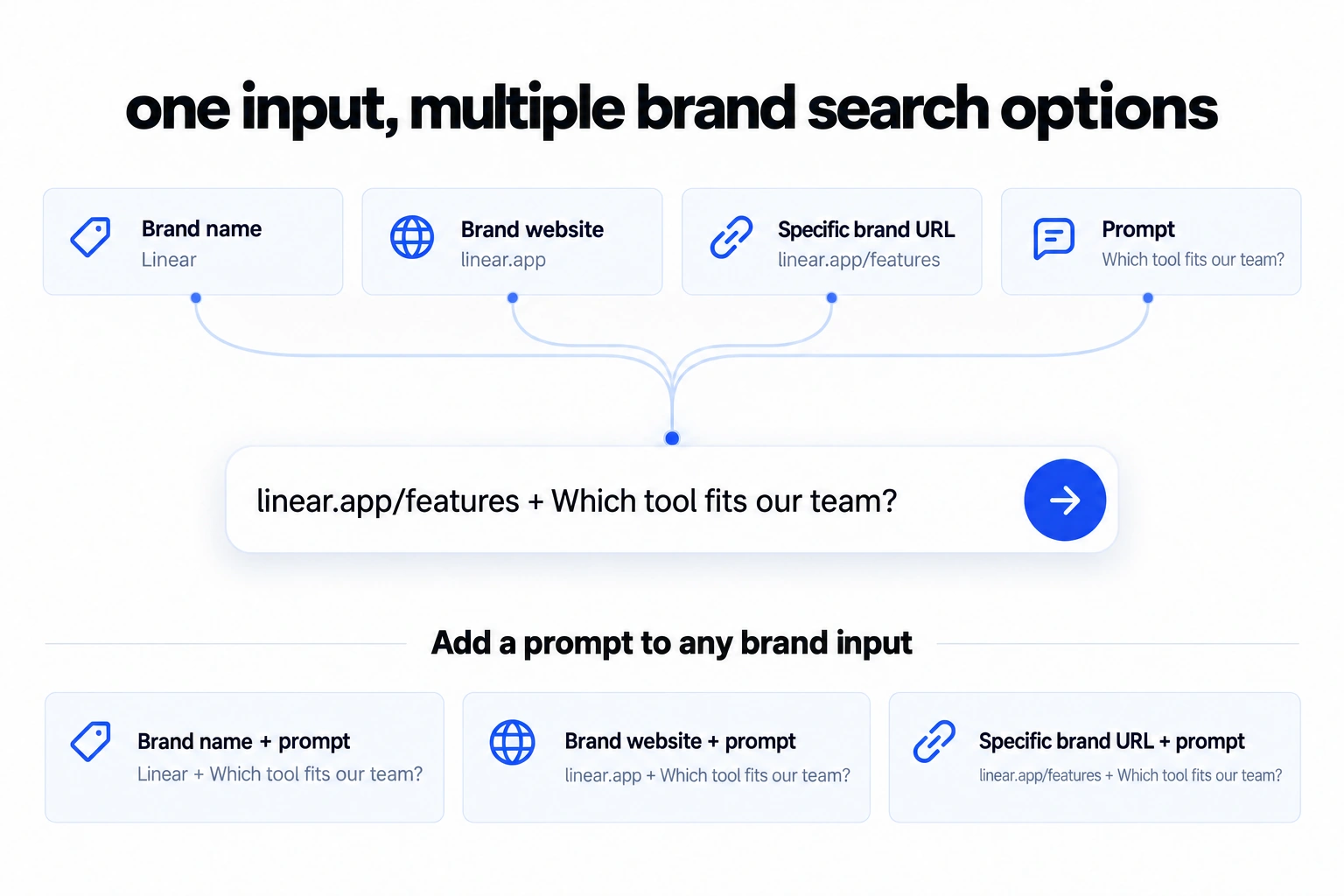
Start with a brand name, website, specific page or question. Add your prompt to any brand input using + , then review your search before it runs.
Try your searchSet the scope, inspect the answers and give your team something specific to improve. Every step keeps the original evidence connected.
Follow the Shopify example from your first search to original answers, cited pages and a useful next step.
9:38Follow a buyer question from a new search to original answers, cited pages, practical actions and a complete report.
Watch tutorialTake the same analysis into a client report, a team presentation or your own spreadsheet. Saved-report exports cost no credits.
See how AI answers buyer questions about CRM, ecommerce and project-management tools. Explore the exact responses, cited pages and practical next steps in each report.
What are the best CRM platforms for a small business with a five-person sales team that needs contact management, email integration, pipeline reporting and room to grow? Compare the leading options, key strengths and limitations, and who each is best for.
Five saved answers from one CRM buying question. Original dates and evidence remain available. Independent example; no affiliation or endorsement.
What are the best ecommerce platforms for a growing UK homeware retailer with 250 products, £30,000 in monthly online sales, a small team and no dedicated developer? Compare total costs, UK payments and VAT, inventory and shipping integrations, international selling, SEO and migration risks. Explain the strengths, limitations and best fit of each option, and cite useful sources.
Five saved answers. Four captured on 15 October; Claude updated on 17 October 2026. Independent example; no affiliation or endorsement.
Which project-management tools best suit a 15-person B2B software startup using GitHub and Slack, with two-week development cycles and no dedicated project manager? Compare issue tracking, roadmaps, integrations, setup effort and total cost for 15 users. Explain the best fit and trade-offs of the leading options, and cite useful sources.
Provided page: linear.app/features
Five saved answers from the original product-page input and buyer question. Every answer keeps its capture time. Independent example; no affiliation or endorsement.
Choose 100, 300 or 750 credits per month.
Only the monthly allowance changes. Every feature is included.
A focused allowance for recurring checks.
1 credit = 1 complete search and report
More capacity for questions and comparable repeat checks.
1 credit = 1 complete search and report
A larger allowance for regular client reporting.
1 credit = 1 complete search and report
Prices in USD per month, plus applicable tax. One credit equals one complete search: one buyer question, one market and language, one run across all selected available sources, with its report. Repeat runs consume more credits; these are monthly totals, not daily prompt allowances. Plan your usage →
A newly verified account receives one complete AI search and report. Start with your business, a specific page or your own question, then review the question, market and language before you search. No card is required.
ChatGPT, Gemini, Google AI Mode, Claude and Perplexity are supported sources. Your workspace confirms availability before a search, and your report identifies API response evidence. You can choose a supported subset or add Google Organic as a separate search-results comparator without extra credits for that same question and market.
One credit buys one complete buyer-question search across your selected available sources, in one market and language, plus its saved report. Additional questions, markets or repeat runs are separate searches. Failed or incomplete searches cost no credit; reading and exporting saved reports is free.
Yes. Choose a monthly plan with 100, 300 or 750 credits. The allowance resets each paid billing period; unused monthly credits do not roll over. Cancel renewal in Billing and your subscription continues to the end of the paid period. There are no automatic overage charges. Previously purchased credits remain valid and do not expire.
No. It shows what the selected AI sources returned for your question at collection time, then helps you choose improvements to test. AI answers vary. Comparable repeat searches can show changes; they do not prove that a particular edit caused them.
One buyer question is a useful place to start.
Free account · No card · One complete search