 IndexHalo
From a buyer question
to a useful next step.
Watch real searches, original answers and practical decisions. Each walkthrough keeps the scope and evidence in view.
Run your first AI visibility report
Start here if you are new to IndexHalo.
Jump to a chapter 12 chapters
- From a buyer question to a useful next step
- Run your first AI report
- Read the Overview correctly
- Compare positioning and perception
- Inspect answers and cited sources
- Build your prompt coverage
- Turn evidence into actions
- Understand advanced data requirements
- Manage brands and saved searches
- Build and export a report
- Personalize and return to saved work
- Your next search
Chapter links open the selected moment on YouTube.
Read the full transcript English
Know what AI says about your brand
When a buyer asks AI for a recommendation, does your brand appear? We will turn that question into a real search, inspect the evidence, and identify a useful next step.
One workflow, from question to report
In Index Halo, we will run one search, read the original answers, inspect cited pages, and prepare a report. We will distinguish measured findings from recommendations and information that has not been supplied.
The example: Shopify for a UK retailer
Our example evaluates Shopify for a growing UK homeware retailer with a small team and no dedicated developer. This independent walkthrough uses a real search; it does not imply an endorsement from Shopify.
Confirm the brand you want to measure
Open New search. Enter the business website and brand name, then choose Confirm brand. Check this identity carefully: it tells Index Halo which brand mentions and owned website citations to measure.
Write a question with real buying constraints
Write a realistic buying question. Our retailer has two hundred and fifty products and thirty thousand pounds in monthly online sales. The question asks providers to compare practical requirements, costs and migration risks.
Set the market and language
Select United Kingdom and English. Keep the question, market, language and sources consistent in later comparisons. Otherwise, a changed setup could look like a changed outcome. You can review the saved scope later.
Review the sources and cost
Review the sources: Google AI Mode, ChatGPT, Gemini, Claude API responses and Perplexity API responses. Their collection labels matter. Run my AI report shows the one-credit cost before you start.
Follow collection, then inspect what returned
Reports shows collection progress. This search completed across five sources and used one credit. Completion does not guarantee a detailed answer: the saved Claude response is brief. We will inspect the fuller responses directly.
Start with the scope of the Overview
Open Overview and confirm the brand, dates, country and AI sources. This example contains one buyer question across five sources. Read every metric within that scope: it is a snapshot, not a market-wide survey.
Mentioned and cited are different outcomes
Shopify appears in four of five answers: eighty percent visibility. Its website is cited in two of five: forty percent owned citations. Mentioning a brand and linking to its site are different outcomes.
Read share of voice with its comparison set
Share of voice describes observed mentions among tracked brands. Only Shopify is tracked here, so one hundred percent does not mean market dominance. Check the comparison set before drawing conclusions about competition.
Numbered position needs an explicit ranking
Numbered position uses explicit numbered entries. Here, the average is one point zero across three of five answers. Unranked prose is excluded; being mentioned first is not automatically a number-one recommendation.
Use Insights and Ranking for comparison
Insights and Ranking compare tracked brands. This search tracks only Shopify. In Edit brand, add competitor names and domains before a future search. Saving these settings does not rerun the saved report.
Read perception alongside its passages
Open Perception and read the passages behind each theme or sentiment label. These classifications describe the returned wording. They are not customer satisfaction scores or independently verified facts about the product.
Compare the reasoning, not just the score
When sources agree or disagree, compare their reasoning in the linked evidence. Look at cost, fit and limitations. Agreement provides context; it does not prove accuracy. Verify important claims against their cited sources.
Open a full answer in Chats
Choose Chats and open a response. Read the complete answer, collection time and source label. Start with ChatGPT or Gemini here, and continue past the recommendations to their qualifications and references.
Keep a finding connected to its exact passage
Follow a finding's evidence link back to its exact supporting passage. Read the surrounding sentences too. Context helps distinguish a conditional recommendation, a limitation and a simple mention of the brand.
Move from Domains to individual URLs
Domains groups publishers found in the evidence; URLs lists individual pages. Open a domain, then a page, and follow its executions to the original answers. This keeps each source connected to its context.
Read source counts without mixing their meanings
Read the column labels carefully: retrievals and final citations are different events. Counts describe this retained sample; repeated references are not extra answers. Open the cited page to review the source itself.
Organize questions in All prompts
All prompts combines saved questions with measured outcomes. Find questions using search, topics and tags. Add prompt saves wording for later; it does not run a new paid search by itself.
Use Discovery as a starting point
Discovery surfaces eighteen returned research queries here. Choose Review and add to inspect a candidate before saving. Imported search volume, when supplied, describes its source dataset; it is not a measurement of AI prompt demand.
Investigate gaps at the answer level
Gap analysis compares your brand with external sources in each answer. Choose View exact answer before deciding what is missing. A publisher or government website may support the answer without being a competitor.
Open an evidence-backed action brief
In Actions, open the source-support comparison. Eight owned planning pages were retrieved without citation where both fields were supplied. Compare their content with cited support before deciding whether an edit is justified.
Save the task without losing its source
Choose Add to to-do to track a proposal. The saved task retains its source brief, keeping the reason for the work visible. Saving it does not publish changes to your website.
Define done, then verify the outcome
Read the completion check before changing anything. Record the work, then assess a later comparable observation. Implemented does not mean improved visibility, and a before-and-after difference does not establish what caused it.
Fanouts shows only research that was retained
Fanouts shows research queries supplied with a saved response. Review them when available. If queries were not supplied, Index Halo cannot reconstruct that research history or conclude that no research happened.
Crawler activity needs crawler evidence
Crawl insights needs server-log evidence, such as an imported log excerpt. Follow the setup instructions for your own website. Our Shopify search does not grant access to its logs or establish its crawler activity.
Referral traffic needs analytics evidence
AI referrals uses imported analytics. Include landing pages, session sources and sessions in your GA4 export. Citation counts alone cannot tell you how many people visited, converted or bought something.
Manage a brand from My websites
We are now using labelled demonstration records. In My websites, find Edit and the row menu. Archive pauses new collection and removes the brand from the active picker, while preserving historical evidence.
Rename a saved search without rewriting it
Open the brand's Saved searches, then Edit. Save name changes the library label, not the original question or answers. A different question needs a new search, with its scope and cost reviewed first.
Use recoverable Trash and Restore
Choose Move to Trash and read the confirmation. Find the record in Trash, then Restore to Active. This is recoverable organization: original answers, saved reports and billing records remain intact.
Manage prompt scheduling separately
Archiving a search organizes an existing result. Archiving a prompt pauses that saved selection. Restore makes it eligible under its existing schedule, without starting a search immediately. Select visible supports careful bulk changes.
Create a report from the selected evidence
In Reports, choose Create brand report. Check the selected brand, date range and sources in the preview. Opening or exporting this retained evidence does not start another search or consume search credits.
Choose the audience and file format
Choose Report audience and File format. Use PDF for a finished handoff, Word or PowerPoint for editing, and HTML or Markdown for portable reading. Include the evidence appendix when supporting detail matters.
Keep the complete evidence available
Open More for Complete data ZIP to keep the full retained dataset alongside your report. The archive follows the selected report or saved view. It preserves evidence; it does not collect new information.
Control layout, sections and branding
Open Layout, sections and branding to set the title, recipient, publisher and accent colour. Review the included sections before downloading. Scope and methodology help readers understand exactly what the report can establish.
Choose a chart palette in Settings
In Settings, choose Index Halo, Ocean, Orchid or Sunset chart colours. The preference is saved in this browser. It changes presentation, not measurements. Your exported report's branding has separate controls.
Review settings and credit activity
Settings links to profile, tracking and prepaid credits. View credit activity explains available, reserved and consumed credits. Existing results remain available when credits run out; review the cost before another paid check.
Save a repeatable report view
Create a report view to reuse sections and filters. Choose a fixed date range or rolling range, then Save view. Rolling views read the latest retained data; saving one does not collect answers.
Keep the evidence-to-action loop intact
You have followed one question into a real search, checked the sample, opened original answers, and prepared a report. Now choose a specific action whose supporting evidence and completion check remain attached.
Start with one question you care about
Start with one question that matters to your customers. Confirm the scope and cost, then inspect the answers before deciding what to change. That is the Index Halo loop: question, evidence, action and report.
Turn saved results into useful actions
Continue with a closer look at the evidence.
Jump to a chapter 12 chapters
- The question behind the numbers
- Choose the saved evidence
- Read the four measures
- Compare brands and claims
- Follow the original sources
- Explore prompts and research
- Turn findings into useful work
- Understand the extra evidence
- Manage saved work
- Create a shareable report
- Return to the right view
- Repeat the evidence-led workflow
Chapter links open the selected moment on YouTube.
Read the full transcript English
Seen in every answer. Cited in only two.
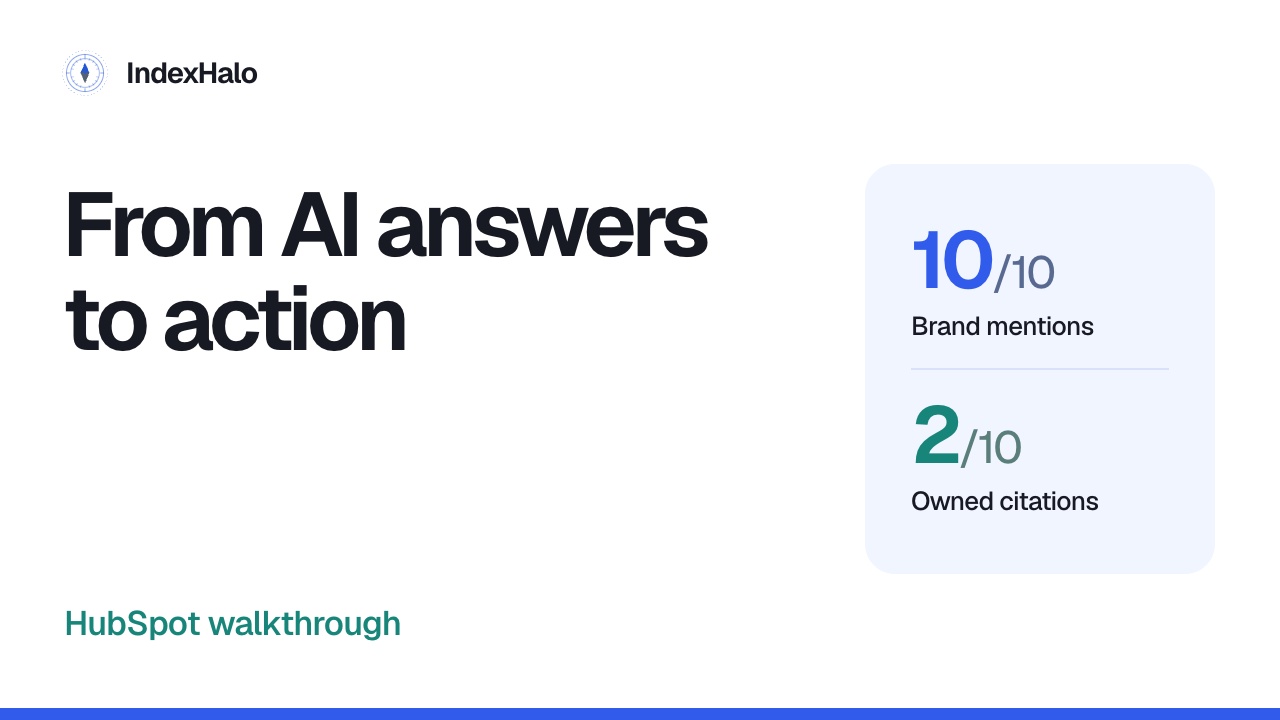
HubSpot appears in all ten answers here. Only two cite its website. We will use Index Halo to understand that difference, inspect the evidence, and turn it into useful work.
From a number to a decision
The workflow has three parts: choose the evidence, read what the answers say, then decide what to do. We will finish with a report that keeps those findings connected to their sources.
Start with the buyer’s situation
Our question concerns a business with five salespeople. It asks for contact management, email integration, pipeline reporting and room to grow. We are studying this buying decision, not every possible CRM search.
Select HubSpot’s saved work
Choose HubSpot from the brand selector. We are opening saved results, without running another search. The workspace lets you move between the overview, original answers, sources and proposed actions.
Check the scope before comparing
Check the filters first. These answers are from the thirteenth and fourteenth of October, in United States English. Last fourteen days and all surfaces are selected for this walkthrough.
Keep the collection labels visible
The evidence covers Google AI Mode, ChatGPT, Gemini, Claude and Perplexity. Read the collection labels. Claude and Perplexity are labelled API responses, distinct from the captured search and assistant interfaces.
Ten answers, two collection dates
These ten answers come from two collections of the same question. That is useful comparison material, but not a broad market study. Keep the dates and question attached to your conclusions.
Visibility and citations answer different questions
Visibility is one hundred per cent: ten answers name HubSpot. Owned citations are twenty per cent: two answers cite its website. A brand can be discussed without its own pages providing cited support.
Share of voice has its own denominator
HubSpot’s share of voice is twenty-one point three per cent: ten of forty-seven appearances across five configured brands. Several brands can appear in one answer. This is not market share.
Read numbered position with coverage
Numbered position is one point zero, measured in seven of ten answers. It comes from explicit numbered entries. Three remain unmeasured; we cannot claim that every source recommends HubSpot first.
Compare the configured brands
Open Ranking to compare the same scope. HubSpot, Pipedrive, Salesforce and Zoho appear in all ten answers; Freshsales appears in seven. Choose which original comparisons deserve a closer read.
Read how the answers portray the brand
Perception groups recurring answer themes. Connected workflows and ease of adoption appear alongside cost concerns. These describe the saved responses. Read the linked passages before repeating a claim about the product.
Notice the repeated cost concern
All ten answers raise advanced-feature or upgrade costs. That recurring concern gives us a useful investigation. It does not prove that a quoted price or plan limit is current or correct.
Use disagreements as a fact-checking cue
One saved ChatGPT answer says the free plan is limited to two users; a Claude answer says unlimited users. Keep both as attributed claims, and verify approved current facts before publishing either.
Open the complete answer
Open Chats, then choose an answer. The detail view keeps the question, source, collection time and full response together. Read beyond the preview: important qualifications can appear further down.
Locate the exact supporting passage
Supporting passages show the wording behind a finding. Here, the cost concern links to a specific part of the answer. Read the surrounding context, rather than treating a quotation as the whole recommendation.
Keep each claim attached to its source
The source-specific task preserves the claim about advanced automation, forecasting and reporting, alongside its origin. Inspect the linked answer and cited pages, then decide whether the wording is supported, outdated or unresolved.
Inspect the domains behind the answers
Domains shows sites appearing in the citation evidence. Pipedrive appears in five of ten answers; HubSpot appears in two. These counts prioritise investigation, but do not explain why an answer chose a brand.
Move from a domain to a specific page
Switch to URLs and filter for HubSpot’s sales pricing page. Open its retained executions, then choose an answer. This connects the source URL to the response, so you can inspect the citation in context.
Separate retrieval from citation
Retrieval and citation are different records. This comparison identifies eleven owned planning pages retrieved without citation, and eight answers naming HubSpot without citing its website. Retrieval does not guarantee citation.
Organise the questions you track
All prompts keeps questions and measured results together. Review the wording before adding another prompt. A useful addition explores a different buyer need; saving a prompt is separate from collecting new answers.
Use Discovery as a research starting point
Discovery gathers candidate questions and phrases from retained evidence. Inspect their source before deciding what to track. A returned research phrase does not prove search demand; missing volume should stay unmeasured.
Investigate gaps at answer level
Gap analysis compares your brand’s presence with the outside sources cited in each answer. HubSpot appears throughout this scope. Another site being cited does not, by itself, mean your brand is missing.
Read the returned research queries
Fanouts shows research queries actually retained during collection. Open the associated evidence to understand each phrase. This records returned research activity, not a complete account of a model’s private reasoning.
Open the practical task brief
In Actions, expand Task briefs, supporting passages and completion checks. Open the first brief: Clarify the cost of growing a five-person sales team. The recurring theme now becomes a specific task.
Define a useful deliverable
The deliverable is a dated five-seat cost-and-feature comparison. Cover the requested capabilities, their required plans, and applicable onboarding charges or add-ons. Answer the buyer’s question clearly, using approved facts.
Inspect before recommending a page change
Inspect current pricing content and approved plan information. Record what answers the question and what needs clarification. A justified no-change decision is useful; repeated model claims do not automatically mean the website is wrong.
Review evidence quality before acting
This scope has three proposed tasks. One asks you to resolve a flagged response before using it. Review that limitation alongside pricing and source comparison, then decide what belongs in the final brief.
Make completion checks concrete
Record assumptions, approval and the exact page section reviewed. If you later request a new search, compare equivalent scopes. Completing the task is an implementation milestone, not proof of improved visibility.
Know what crawl evidence can tell you
Crawl insights uses retained logs to show observed activity. Crawlability examines page access. Treat these as separate questions, and follow setup guidance when evidence is missing. An empty panel does not establish zero activity.
Keep referrals separate from citations
AI referrals uses imported analytics to examine visits attributed to AI sources. That differs from citations inside answers. Without the relevant analytics, we cannot turn these citations into claims about visits or sales.
Edit brand settings without rewriting history
Use Edit brand to maintain the name, website and comparison brands for future work. Read the explanation before saving. Settings changes do not rewrite original answers or automatically run another search.
Give saved work a useful name
In the report library, rename saved work to make it easier to find. This changes its display label, not the original buyer question or collected answers. Keep that distinction clear when organising your account.
Archive, restore and use recoverable Trash
Archived work can be restored, and Trash is recoverable. This local demonstration leaves the real HubSpot records unchanged. Prompt management pauses saved selections; managing a completed report organises history while preserving original evidence.
Create a report from the selected evidence
Open Reports and choose Create brand report. Check the preview’s ten-answer scope before sharing. It should preserve our opening distinction: ten answers mention HubSpot, and two cite its website.
Choose the audience and format
Choose the audience, then the format: PDF, HTML, Word, PowerPoint or Markdown. Use an executive overview for decisions, or a more detailed view for the people checking the evidence.
Include the evidence needed for review
Include the evidence appendix when readers need full answers and sources. Use the evidence export for a complete structured handoff. Check its scope, so the file supports the same conclusions as the dashboard.
Save a view for the next review
Saved views help you return to a useful report arrangement. Choose the sections and scope, then use Save view to keep them. A view organises retained evidence; it does not create a measurement.
Make the workspace easier to read
Settings includes chart appearance choices. Pick a palette that keeps your brand and comparison series easy to distinguish. Presentation can change without changing the underlying answers, source relationships or metric definitions.
A repeatable review process
Check the scope, read the evidence, then define useful work. Here, strong visibility sits alongside limited owned citations and a recurring cost concern. Each finding leads to a different question.
Start with a specific buyer question
Start with a buyer question you need to understand. In Index Halo, keep original answers close to every metric and recommendation. Your next content decision becomes easier to explain, review and revisit.
Try it with your own buyer question.
Confirm your brand and scope, then inspect the answers before deciding what to change.
About these recordings and music
Recorded in October 2026. Product interfaces and saved model claims may change. The Shopify film runs one new search; the HubSpot film reads existing results. Local record-management demonstrations are labelled. Product names and logos identify the examples and sources and do not imply endorsement.
English narration uses an AI-generated voice.
Music: ‘Meanwhile’ by Scott Buckley — released under CC-BY 4.0. www.scottbuckley.com.au. Creative Commons Attribution 4.0. Edited and crossfade-looped, with fades, level adjustment and frequency carving beneath narration.