Five AI sources in every search
Each search asks ChatGPT, Gemini, Google AI Mode, Claude and Perplexity the same question for one credit.
Where: Prompts › All prompts › New search
 IndexHalo
IndexHalo asks your buyers' questions across ChatGPT, Gemini, Google AI Mode, Claude and Perplexity, keeps every full answer and citation, and turns them into findings, actions and reports.
Each capability below says what it does, where it is in the product and whether it is live. “Available once connected” means the feature is built and switches on when its connection is set up. “Source on request” means the code is shared on request (support@indexhalo.com) for you to deploy; it is not a listed app or public download.
IndexHalo asks your buyers' questions across ChatGPT, Gemini, Google AI Mode, Claude and Perplexity, keeps every full answer and citation, and turns them into findings, actions and reports.
The interface, reports and emails are in English. You can track questions in 13 countries and 17 question languages; each saved question keeps its own market and language, and every answer is kept word for word in its original language. Tone, recommendation, reputation and positioning rules read English, German, French, Spanish and Dutch answers. Spanish wording has been checked on test passages only, not yet on real answers. Answers in other languages show 'not classified (language)', never a zero. Buyer routing, Why-this-answer criteria, concern sources and fact disagreements read English answers only for now.
Results are counts with their denominators, for example “Named in 31 of 50 answers”. Being named is kept apart from being recommended, unknown is never shown as zero, and change is shown only between matched repeat checks.
How questions are asked, where and when.
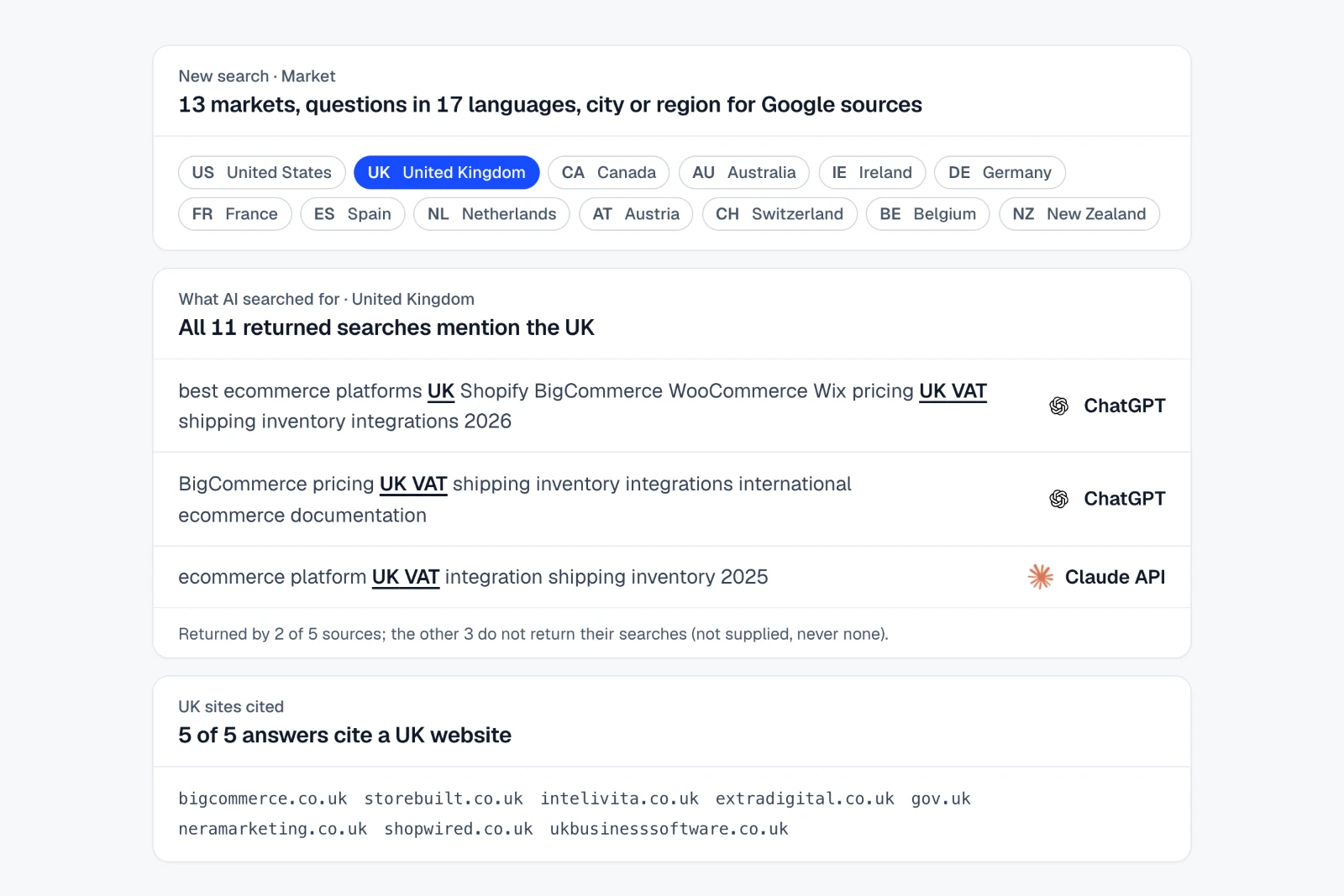
Each search asks ChatGPT, Gemini, Google AI Mode, Claude and Perplexity the same question for one credit.
Where: Prompts › All prompts › New search
Each saved question keeps its own market (one of 13 countries, or one of 100 regions and cities for the Google sources) and its own language (one of 17): you choose them, or the language follows the question you type and the market your website's own signals, and setup says why. Copy to markets adds a question to other countries without translating it.
Where: Prompts › All prompts › New search
Setup suggests buyer questions from your category, place and competitors, unbranded first; suggestions are starting points, not measured search demand.
Where: Prompts › All prompts › New search
Lists questions and search phrases found in your retained answers that you do not track yet, ready to save as prompts.
Where: Prompts › All prompts › Discovery
Shows the web searches each AI ran behind its answer and the pages it read, where the source returns them.
Where: Results › Chats › Fanouts
Schedule a saved question set daily, weekly or monthly. When you set the schedule, you approve a credit limit per run and per month; each scheduled run uses one credit per question and market.
Where: Home › Reports › Schedules
Runs the same questions again with the same sources, market and language so change can be compared; the cost is quoted before it starts.
Where: Home › Reports
If answers described a different company with the same name, mark them in Chats and send the right website to support@indexhalo.com; we restore the credits once so the affected questions can be re-run free.
Where: Results › Chats, then support
Every answer kept word for word, and what it says about you.
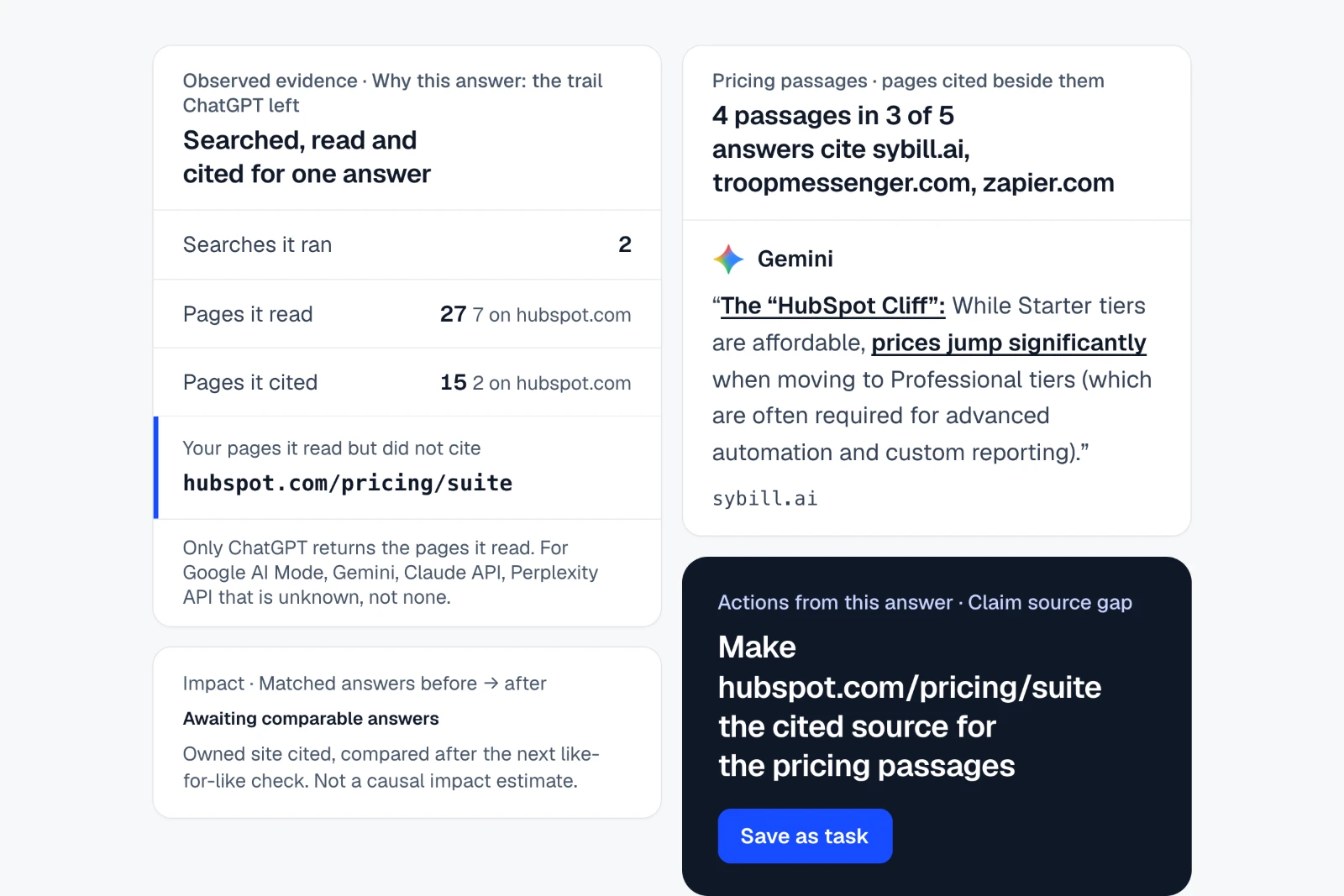
Every answer is kept word for word with its citations, AI source, market, language and collection time, and can be marked as being about a different business.
Where: Results › Chats
Shows the searches an AI ran, the pages it read and the passages it cited, next to the buying criteria the answer used; the criteria rules read English answers only for now.
Where: Results › Chats › Why this answer
Labels how each answer speaks about your brand (positive, neutral, negative or mixed) from attributable passages in English, German, French, Spanish and Dutch answers, and shows the attributes answers connect to you.
Where: Brand › Perception › Tone & identity
A grid of descriptors (for example affordable or premium) against AI sources that counts how many answers use each end for you and each compared brand.
Where: Brand › Perception
Collects claims about your brand that need review, with the answers that made them, so you can correct, track and recheck them.
Where: Brand › Reputation
Compares answers with the facts you approve, such as prices, features, hours and locations, and lists possible conflicts for a person to review.
Where: Brand › Accuracy
Matches the wording answers use about you against your own positioning statements, without a positioning score.
Where: Brand › Accuracy › Positioning
Shows visibility for each branch or location you add, with the branch facts answers state.
Where: Brand › Locations
Shows whether answers name your products and how they describe them, and flags catalogue discrepancies.
Where: Brand › Products
You against the brands in the same answers, with denominators.
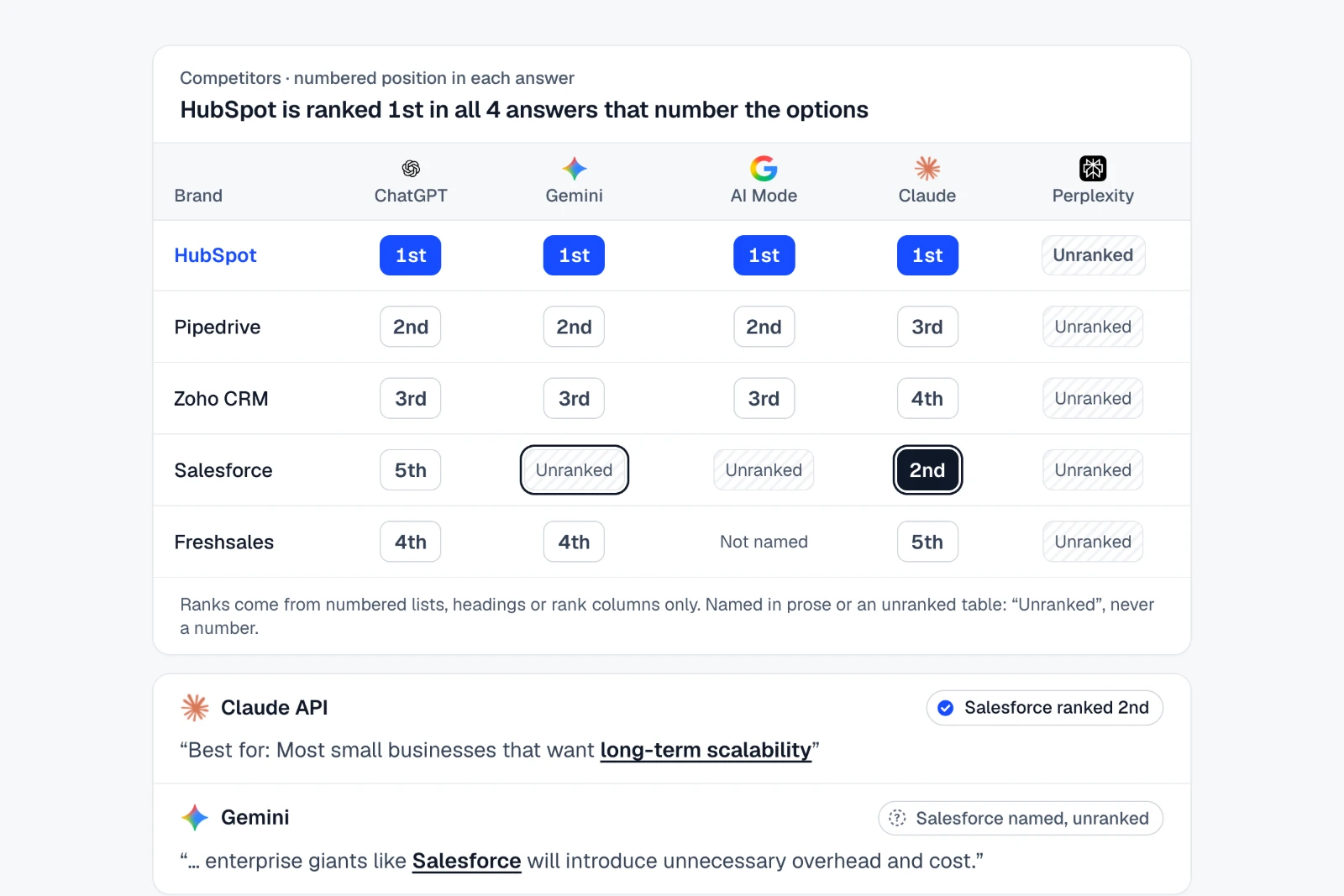
Orders brands by where each answer first names them; being named is kept apart from being recommended.
Where: Results › Ranking
Counts how often you and each compared brand are named with the denominator shown, for example 'Named in 31 of 50 answers', source by source.
Where: Results › Ranking › Share of voice
A grid of AI sources against brands showing how often each source names each brand in the same answers.
Where: Home › Overview
Lines over time appear only when the same questions were checked again with the same sources, market and model; a single check shows bars, never a trend.
Where: Brand › Insights › Visibility
Lists questions where compared brands are named or cited and you are not, with the sources behind them.
Where: Sources › Cited sources › Gap analysis
Each competitor is matched by its own website, with a free 'Find their website for me' preview; competitors saved by name only are flagged in reports.
Where: Prompts › All prompts › New search
The pages and domains AI answers cite.
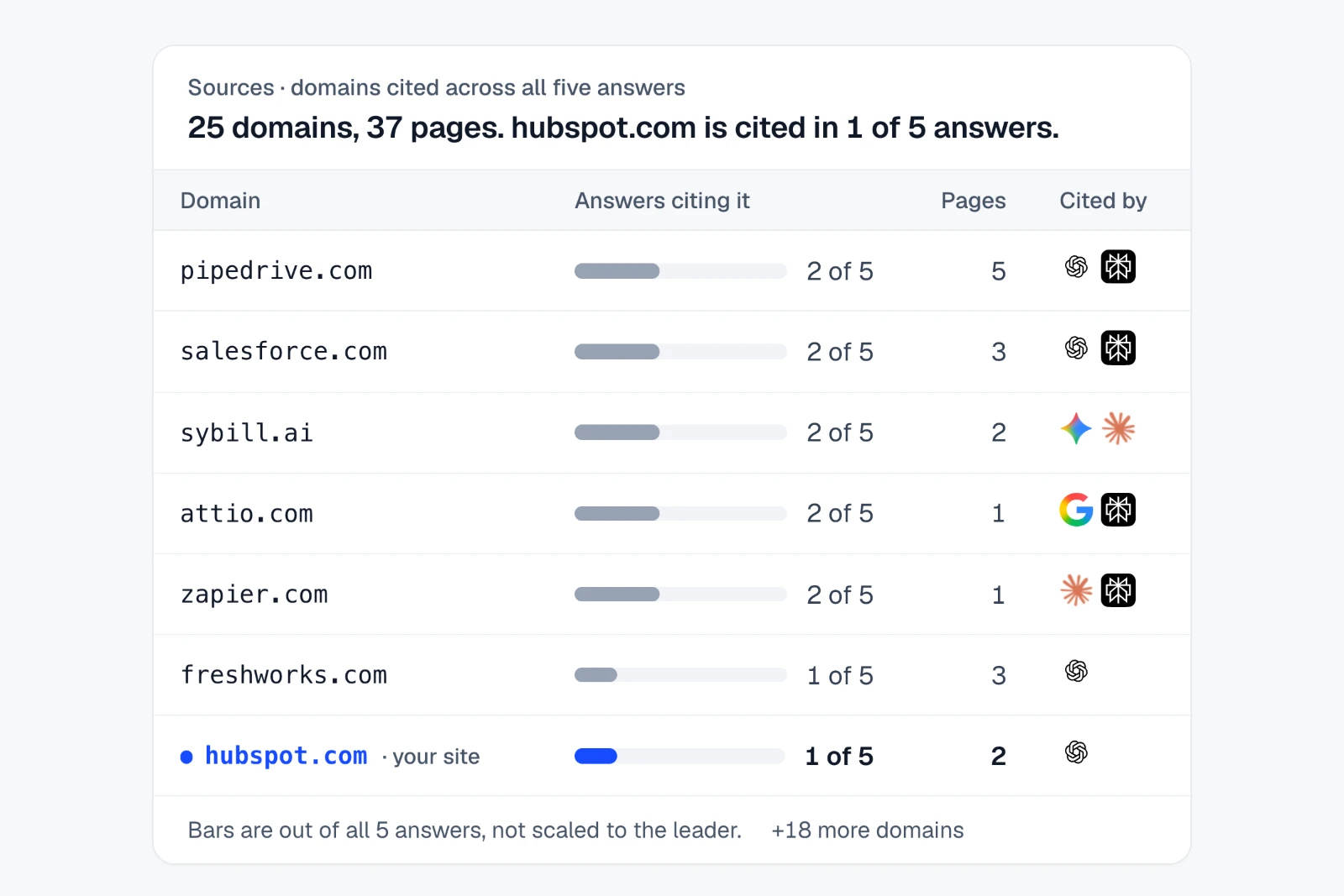
Every domain and URL the answers cited, with how often and for which questions and AI sources.
Where: Sources › Cited sources › Domains
Answers that name your brand without citing your website, so you know which pages and sources to work on.
Where: Home › Overview › Visibility map
The searches and pages AI used for questions where you were missing, turned into briefs for the content to create or strengthen.
Where: Results › Chats › Fanouts
Which cited sources persist, arrive or fade across matched repeat checks.
Where: Sources › Cited sources › Citation trends
Your site as AI crawlers and visitors from AI see it.
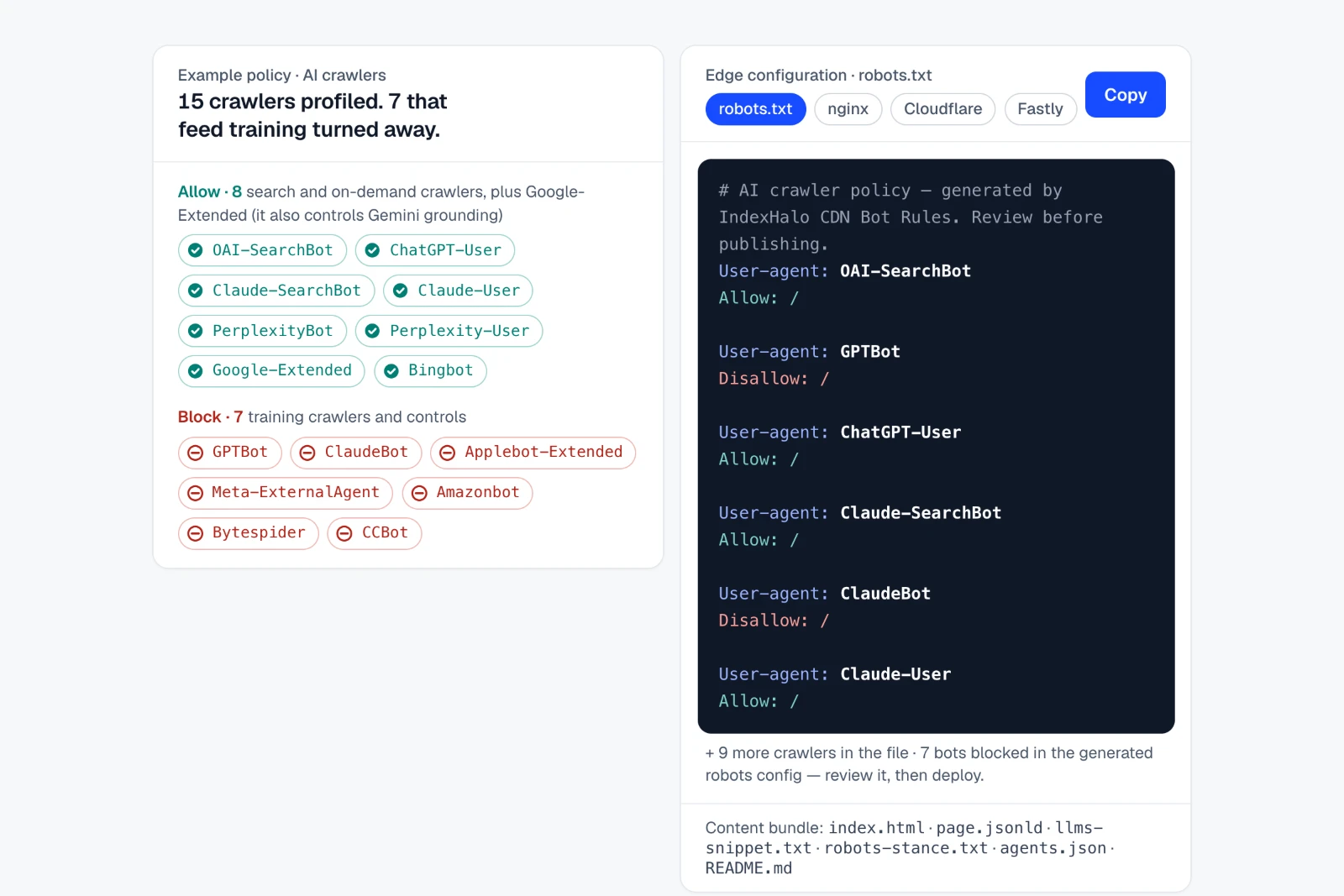
Reads your robots.txt for 28 AI crawler and control tokens and gives copy-ready rules to allow or block each one.
Where: Agent analytics › Crawlers & referrals › Crawlability
Paste or upload server logs to see which pages AI crawlers requested (pasted logs recognise 26 AI crawlers), or send a sanitised event feed; IP addresses are discarded.
Where: Agent analytics › Crawlers & referrals › Crawl insights
Upload a GA4 export to see visits that arrive from AI assistants, by landing page; direct and unattributed visits are never counted as AI.
Where: Agent analytics › Crawlers & referrals › AI referrals
Import Search Console or Bing Webmaster exports to see search demand beside your tracked questions, kept apart from AI answers.
Where: Prompts › All prompts › Search demand
Read-only GA4 and Search Console sync is built and available once connected.
Where: Agent analytics › Crawlers & referrals › AI referrals
Every brand you track side by side, with data freshness, goals and open work.
Where: Home › My websites
Work with an owner, the evidence behind it and a later check.
Each action links to the answers behind it, has an owner and a due date, and is marked verified only by a later comparable check.
Where: Optimize › Actions
Before-and-after views of the work you shipped, from matched checks; an association, not proof of cause.
Where: Optimize › Impact
Reports, sharing and the views each role starts from.
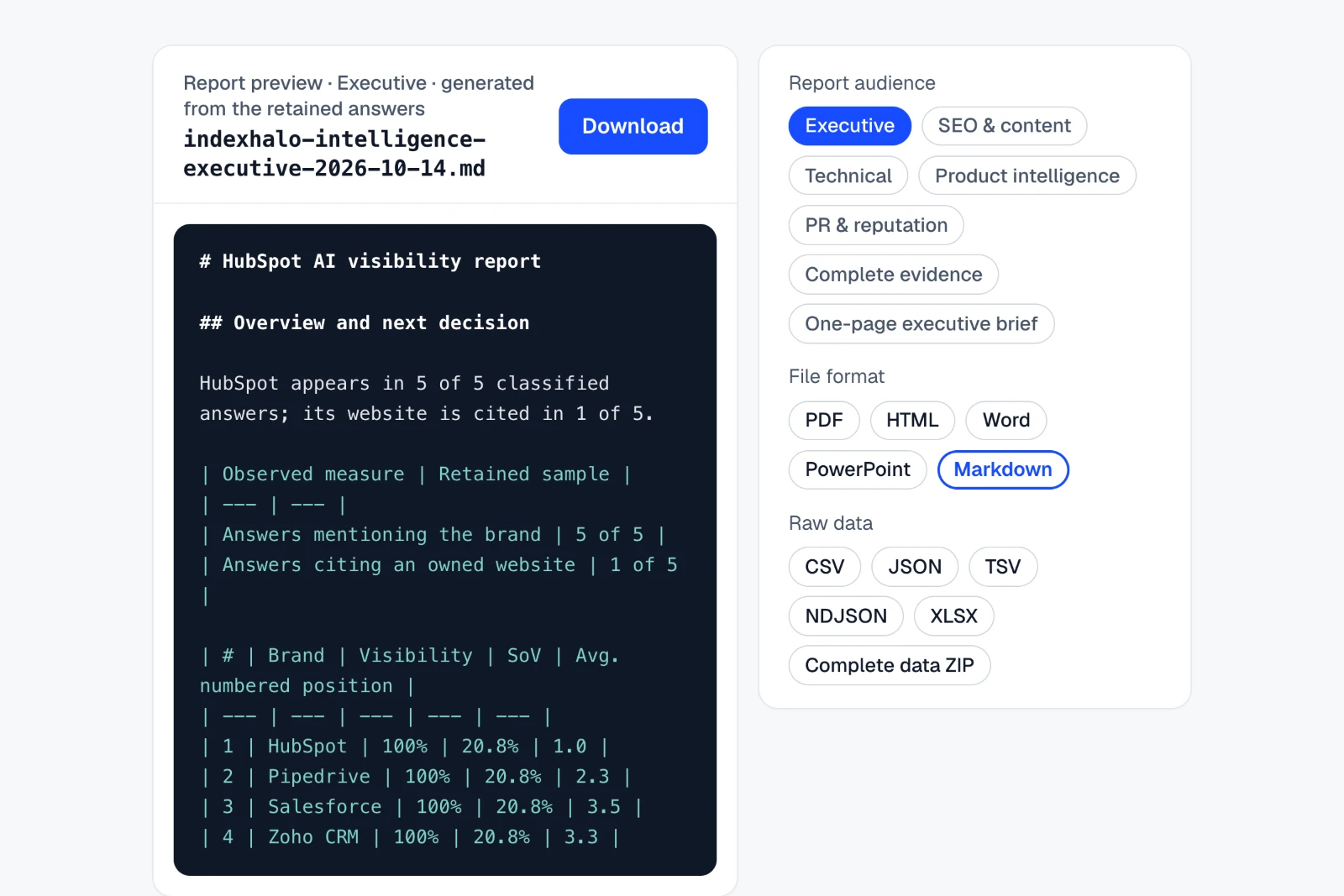
Download reports as PDF, Word, PowerPoint, Markdown, HTML and JSON for 7 audiences (Executive, SEO and content, Technical SEO and development, Product intelligence, PR & reputation, Complete evidence and One-page executive brief); exporting a saved report uses no credits.
Where: Home › Reports
Reports export with your own name, logo and accent colour on every plan; methodology notes, dates and denominators stay.
Where: Settings › Appearance
Share a read-only client portal link that expires after 30 days by default, or up to a year, and revoke it at any time.
Where: Home › Reports
Shows the charts on a page full screen, one per slide, with the takeaway on top and a link to each chart's evidence, for client calls and meetings.
Where: Home › Overview
Email a saved report daily, weekly or monthly to the people you choose, and get a weekly digest by email, Slack or Microsoft Teams.
Where: Home › Reports › Schedules
Overview opens in one of 10 starting views, such as Content, SEO & web, Brand & PR and Product marketing, with the same numbers in each.
Where: Home › Overview
Send the same data to your own tools. Every integration is on the integrations page. See every integration.
A REST API with scoped keys, a private MCP endpoint for your own AI assistant, and CSV, JSON and NDJSON feeds for Google Sheets, Looker Studio, Excel and Power BI.
Where: Settings › Integrations
Signed webhooks with Zapier, Make and n8n templates, and readable messages in Slack or Microsoft Teams through incoming webhooks.
Where: Settings › Integrations
Send drafts and summaries to WordPress, Webflow, Notion and HubSpot, and actions to Asana, ClickUp, monday.com, Jira and Trello.
Where: Settings › Integrations
People, roles and billing.
Invite people as Admin, Reviewer / approver, Editor or Viewer, limit them to chosen brands, send runs above a credit threshold to an approver, and keep an activity log.
Where: Settings › Team
Monthly plans with the same features, top-up packs at plan prices for subscribers, and self-service upgrades with a prorated preview.
Where: Settings › Billing
Stated plainly, so nobody has to guess.
The full method is on the method page.
IndexHalo asks your buyers' questions across ChatGPT, Gemini, Google AI Mode, Claude and Perplexity, keeps every full answer and citation, and turns them into findings, actions and reports.
Every search asks ChatGPT, Gemini, Google AI Mode, Claude and Perplexity by default, for one credit per question. Google organic results can be collected as their own search, for one credit per question, and are kept apart from AI answers. Claude and Perplexity answers come from their APIs with web search, which can differ from a signed-in conversation.
Yes. REST API v1 with scoped, revocable API keys and an OpenAPI 3.1 description at /api/v1/openapi.json. Create keys in Settings › Integrations. Keys can read data and create draft actions; no key can publish to a website.
Yes. A private MCP endpoint at https://www.indexhalo.com/mcp lets your own AI assistant read your IndexHalo data with a scoped API key. Its 6 tools are list_brands, get_results, list_questions, search_answers, get_actions and get_reports. It does not register your brand with any AI service.
Yes. Pull IndexHalo's CSV feeds into a Google Sheet with IMPORTDATA, then add that Sheet as a Looker Studio data source. A Looker Studio Community Connector is available on request as Apps Script source that you deploy once. Excel and Power BI read the same feeds with Get data › From Web.
Yes, on every plan. Reports export with your own name, logo and accent colour, and you can share a read-only client portal link that expires after 30 days by default, or up to a year.
Schedule a saved question set daily, weekly or monthly. When you set the schedule, you approve a credit limit per run and per month; each scheduled run uses one credit per question and market. Report emails and a weekly digest can be scheduled too.
The interface, reports and emails are in English. You can track questions in 13 countries and 17 question languages; each saved question keeps its own market and language, and every answer is kept word for word in its original language. Tone, recommendation, reputation and positioning rules read English, German, French, Spanish and Dutch answers. Spanish wording has been checked on test passages only, not yet on real answers. Answers in other languages show 'not classified (language)', never a zero. Buyer routing, Why-this-answer criteria, concern sources and fact disagreements read English answers only for now.
Upload a GA4 export to see AI referral visits by landing page. Search Console and Bing Webmaster exports can be imported too. Live GA4 and Search Console sync is built and available once connected.
No. IndexHalo reports counts with their denominators, for example 'Named in 31 of 50 answers', and keeps being named apart from being recommended. Change is shown only when the same questions were checked again under the same scope.
Monthly plans: Professional $49 for 100 credits, Business $129 for 300 credits and Agency $299 for 750 credits a month, plus tax. Every plan has every feature. Subscribers can add top-up packs at the same prices. Plan and top-up credits expire at the end of the billing month and do not roll over. Credits bought as one-time packs before monthly plans launched keep their balance and are shown separately.
One free complete AI search and report after you verify your email. No card required.
One free complete AI search and report after you verify your email. No card required.